TIME FRAME
March 2020 - May 2019
MY ROLE
UX/UI Designer
PLATFORM
Browser extension

Some websites are known to collect our data. In order to avoid it, we would prefer to see their content without a need to log in into their database. A way of doing that can be by opening some websites in the Incognito Mode. This action allows us to get access to their content without having to deal with any blocking pop-ups or content limitations. A few examples of websites that we could consider as not so log-in-worthy are: Medium.com, YouTube or Amazon. Another way to protect out data would be using an alternative website to the one we wanted initially, one that offers similar services but with a full respect to our data privacy.

In order to open a Website in the Incognito Mode, we have to copy its address and paste it in a New Private Window (Firefox) or New Incognito Window (Chrome). Doing it multipletimes a day can be annoying, time consuming and generate unnecessary clutter in our browser. On top of that, opening the same list of websites over and over again in a separate window can make the situation feel even more irritating and inefficient.

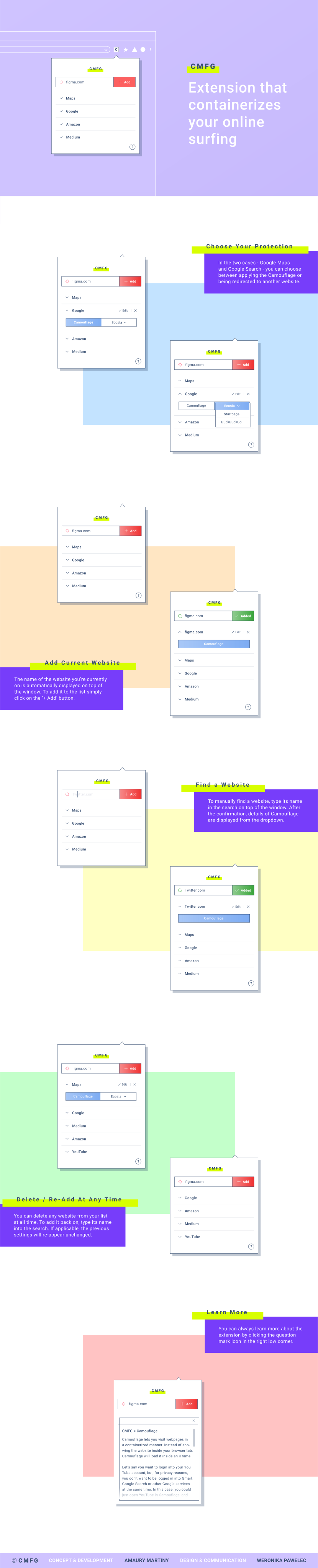
CMFG = CAMOUFLAGE
Camouflage lets you visit webpages in a containerized manner. Instead of showing the website inside your browser tab, Camouflage will load it inside an iFrame. Let’s say you want to login into your YouTube account, but, for privacy reasons, you don’t want to be logged in into Gmail, Google Search or other Google services at the same time. In this case, you could just open YouTube in Camouflage, and log in there. You will stay logged out of Google while browsing other websites. A containerized tab acts as a mini incognito mode in your browser. It doesn’t share the same context as a normal tab. If you hit the monthly article limit on Medium, just open Medium in Camouflage, and your article count will be reset again!